Standard Report: Duo-Trio Test Results
Overview
Analysis of Duo-Trio data in Compusense is performed using a one‑tailed binomial test.
The analysis outcome will depend on the setting you selected for the Panelist asked to select sample which is option in the Question options. It is very important that the option selected there is what you expect and that the panelists were instructed to evaluate the samples according to the option selected.
In other words, if you kept the default text in the instructions for panelists to select the sample that is the same as the reference, but in the Question options you toggled Panelist asked to select sample which is option to Different, then your data is mismatched and the analysis will not be correct. The same problem will occur if the reverse is true.
Duo-Trio Analysis Options
When generating the Duo-Trio Standard Report, it is important to select the options that meet your analysis objectives. Go to Results > Reports > Create report. Click Filters and apply any necessary filters on your data before generating the report.
Select Standard report and expand the 2. Select options list to review all the options.
- Sensory discrimination (exact) analysis - This analysis is a
statistical non-inferiority test (which in this case is a binomial test
of the lower tail) and it aligns with the ASTM standard E3009-23a. This
analysis type is used in the following Discrimination tests: Triangle, Tetrad, and Duo-Trio.
These options are selected by default. Any changes in the selections and values will be saved for the next time you run the report. - Difference Test – Enter the Alpha you wish to use for this test or turn off the Difference Test analysis by removing the checkmark from the checkbox. Update the d' (d prime) by typing directly in the box. You will notice that the Pd and Pc values will automatically recalculate.Difference thresholds:Update the d' (d prime) by typing directly in the box. You will notice that the Pd and Pc values will automatically recalculate.If you update the Pd, then the d' and Pc values will automatically recalculate. Likewise, if you update the Pc value, the d' and Pd values will automatically recalculate.
- Equivalence Test – An equivalence test is a statistical method used to demonstrate that two samples are practically the same within acceptable limits. Unlike traditional hypothesis tests, which assume equality and look for differences, an equivalence test starts by assuming the samples are different and seeks to prove they are “close enough.”
Control whether the Equivalence test analysis is included in the report by adding in or removing the checkmark from the checkbox. - Equivalence test for replications - This option is only compatible with Triangle tests, Tetrad test, and Duo-trio test, and these
tests have to have an experimental design where the same samples were
presented to panelists at least twice (i.e the test includes
repetitions). In other words, if your test is a single Duo-Trio or a back to back Duo-Trio with more than two samples, even if you select
this option, the equivalence analysis for reps is not applicable and
therefore will not be included in the report.
The Equivalence test for replications analysis is based on Meyners, M., Carr, B. T., & Kunert, J. (2023). Equivalence and non‐inferiority tests using replicated discrimination and preference data. Journal of Sensory Studies, 38(6), e12882. https://doi.org/10.1111/joss.12882
Control whether the Equivalence test for replications analysis is included in the report by adding in or removing the checkmark from the checkboxes.
Equivalence thresholds: - Alpha. The Alpha value is applicable to both the Equivalence test and Equivalence test for replications. The default value is 0.05. Update as necessary.
- d'. The d-prime value is applicable to the Equivalence test only. Update as necessary. You will notice
that the Pd and Pc values will automatically recalculate.
- Pd. The Proportion of distinguishers value is applicable to both the Equivalence test and Equivalence test for replications. If you
update the Pd, then the d' and Pc values will automatically
recalculate.
- Pc. The Proportion correct value is applicable to the Equivalence test only. If you update the Pc value, the d' and Pd values
will automatically recalculate.
- Discrimination analysis - This analysis follows the formulas published in the Sensory evaluation techniques by Meilgaard et al. This analysis has been supported in Compusense since the original implementation of this test type.
These analysis options are not selected by default, but any changes you make will be saved for future use until modified. - Difference Test
- This is the default analysis. Change the Alpha value if desired, or turn off the
Difference Test analysis by removing the checkmark from the checkbox.
- Similarity Test - Analysis type used in Discrimination tests (Triangle, Tetrad, Same/Different,
3-AFC, Duo-Trio, 2-out-of-5, A-not-A, and Torgerson's) when high
confidence is required that the samples are perceived the same. This
analysis can be used in quality control tests, for example. Turn the
Similarity Test analysis on or off when generating the report.
Set the Alpha and Beta values according to your company standards.
Duo-Trio Standard Report Details
What is included in the report will depend on what you selected before generating the report, as described in the previous section of this workflow.
Report and Sample Details
The Standard report for Duo-Trio question data includes the following information about the report itself and about the samples:
- Test Name: This is the name specified in the Overview tab of the test, visible to analysts in the Dashboard, and in the reports.
- Number of Evaluations: The number of completed and/or in progress evaluations included in the report. Whether the 'in progress' evaluations are included in the report will depend on the filters applied before generating the report.
- Test Completion Date: If you set your test to Complete before generating the report, the date when you set the test to complete will be displayed here. No date will be shown if the test is not set to Complete.
- Samples: A table containing the information about the samples in the test that were included in the report.
Sensory Discrimination (Exact) Analysis
Difference Test
- Above the table, the following information is displayed:
- The difference threshold values specified by the user before generating the report.
- Statement on how conclusions are made based on the selected alpha. The confidence % is the only value that will change in this statement depending on the Alpha value specified before the report was generated.
- The table displays the following details:
- p-value: The p-value for each Duo-trio test.
- Responses Required: The minimum number of correct responses necessary to reach the conclusion of Different.
- Conclusion: A conclusion is made based on whether the difference between samples is significantly larger than the difference threshold.
- Triad number: The example screenshot above, annotated with numbered callouts, indicates that a back-to-back Duo–Trio test was executed, resulting in the inclusion of both Triad 1 and Triad 2 rows.
- Pooled: In the analysis where two samples (see the Samples table in our example
above) were evaluated back to back, the N is increased by multiplying
the actual N by the number of tests. Each test is treated as done by
different panelists even though they were seen back to back by the same
panelists. Pooled analysis is not available in single tests and in any
other variation of back to back tests (e.g. more than two tests on two
samples, or more than two sample tests).
- Both Triads: In a back to back Duo-trio analysis (true replicate of two samples), you
can see how many panelists answered both Duo-trio tests correctly. The
probability of panelists correctly identifying the sample that is the same as the control for both tests by
chance decreases. Both Triads analysis is not available in single
tests and in any other variation of back to back tests (e.g. more than
two tests on two samples, or more than two sample tests).
Equivalence Test
- Above the table, the following information is displayed:
- The threshold values specified by the user before generating the report.
- Statement
on how conclusions are made based on the selected alpha. The confidence
% is the only value that will change in this statement depending on the
Alpha value specified before the report was generated.
- The table displays the following details:
- p-value: The p-value for each Duo-trio test.
- Responses Required: The maximum number of correct responses permitted to reach the conclusion of Equivalent.
- Conclusion: A conclusion is made based on whether the difference between samples is significantly larger than the equivalence threshold.
- Triad number: The example screenshot above, annotated with numbered callouts, indicates that a back-to-back Duo–Trio test was executed, resulting in the inclusion of both Triad 1 and Triad 2 rows.
- Pooled: In the analysis where two samples (see the Samples table in our example
above) were evaluated back to back, the N is increased by multiplying
the actual N by the number of tests. Each test is treated as done by
different panelists even though they were seen back to back by the same
panelists. Pooled analysis is not available in single tests and in any
other variation of back to back tests (e.g. more than two tests on two
samples, or more than two sample tests).
- Both Triads: In a back to back Duo-trio analysis (true replicate of two samples), you
can see how many panelists answered both Duo-trio tests correctly. The
probability of panelists correctly identifying the sample that is the same as the control for both tests by
chance decreases. Both Triads analysis is not available in single
tests and in any other variation of back to back tests (e.g. more than
two tests on two samples, or more than two sample tests).
Equivalence Test For Replications
If your test is a single Duo-trio or
a back to back Duo-trio with more than two samples, even if you selected
this option, the equivalence analysis for reps is not applicable and
therefore will not be included in the report.
- Above the table, the following information is displayed:
- Pd. The proportion of distinguishers value.
- Alpha. The Alpha value specified by the user before generating the report.
- X. The total number of correct responses.
- n. The total number of evaluations, not counting reps.
- k. The number of reps included in the analysis.
- The table displays the following details:
- Samples. The pairs of samples
analyzed for equivalence in reps. Your test may have multiple pairs of
different samples, but only those that were evaluated as repetitions (or
replicates) will be listed in the table.
- Responses Required.
The maximum number of correct responses permitted for a conclusion that
the samples are equivalent. In our example screenshot above, we can see that there were 9 correct responses, which is greater than 7, which makes the samples not equivalent.
- # of Correct Responses. The total number of correctly identified same as control samples.
- p-value. The p-value.
- Conclusion. A conclusion is made whether the samples evaluated in replicates are equivalent or not.
Supporting tables
Proportion Correct:
- N: Total number of evaluations included in the report.
- Correct: Count of correct responses (where the sample same as reference was identified correctly (if that is what you selected in the Question options), or where the sample different from the reference was identified correctly (if that is what you selected in the Question options)).
- Incorrect: Count of incorrect responses (where the same samples were not identified correctly same or different from the reference, depending on what you selected in the Question options.
- Estimate Pc: Estimated proportion correct.
Formula: Pc = c / n
Where:
c = number of correct responses.
n = total number of evaluations. - SE: Standard error of the estimate of the proportion of (momentary) discriminators.
- % LCL: Lower confidence limit at the Alpha specified before generating the report.
- % UCL: Upper confidence limit.
- Triad number: The example screenshot above, annotated with numbered callouts, indicates that a back-to-back Duo–Trio test was executed, resulting in the inclusion of both Triad 1 and Triad 2 rows.
- Pooled: In the analysis where two samples (see the Samples table in our example
above) were evaluated back to back, the N is increased by multiplying
the actual N by the number of tests. Each test is treated as done by
different panelists even though they were seen back to back by the same
panelists. Pooled analysis is not available in single tests and in any
other variation of back to back tests (e.g. more than two tests on two
samples, or more than two sample tests).
- Both Triads: In a back to back Duo-trio analysis (true replicate of two samples), you can see how many panelists answered both Duo-trio tests correctly. The probability of panelists correctly identifying the sample that is the same as the control for both tests by chance decreases. Both Triads analysis is not available in single tests and in any other variation of back to back tests (e.g. more than two tests on two samples, or more than two sample tests).
***********Proportion of momentary discriminators (Pd):
- Estimate Pd: Estimated proportion of distinguishers.
- SE: Standard error of the estimate of the proportion of (momentary) discriminators.
- LCL: Lower confidence limit at the Alpha specified before generating the report.
- UCL: Upper confidence limit at the Alpha specified before generating the report.
- Triad number: The example screenshot above, annotated with numbered callouts, indicates that a back-to-back Duo–Trio test was executed, resulting in the inclusion of both Triad 1 and Triad 2 rows.
- Pooled: In the analysis where two samples (see the Samples table in our example
above) were evaluated back to back, the N is increased by multiplying
the actual N by the number of tests. Each test is treated as done by
different panelists even though they were seen back to back by the same
panelists. Pooled analysis is not available in single tests and in any
other variation of back to back tests (e.g. more than two tests on two
samples, or more than two sample tests).
- Both Triads: In a back to back Duo–Trio analysis (true replicate of two samples), you can see how many panelists answered both Duo–Trio tests correctly. The probability of panelists correctly identifying the sample that is the same as the control for both tests by chance decreases. Both Triads analysis is not available in single tests and in any other variation of back to back tests (e.g. more than two tests on two samples, or more than two sample tests).
d prime:
- d' (read d prime): The measure of the extent of the overlap of panelist perception. It is the distance between the means of the two distributions measured in terms of their standard deviation.
The larger the d’ value, the samples are more different. Where the d' value is 0 it means that the samples are indistinguishable. A d’ of 1 or less might be considered small and a d’ of 2 or more might be considered large, but it depends on various factors.
This calculation is always done treating each response as independent, as if the test is unreplicated. For example, d' on a back-to-back test with 50 assessors who provide 2 responses, calculation is done as if there are 100 assessors who provide 1 response each. - SE: Standard error of the estimate of the proportion of (momentary) discriminators.
- LCL: Lower confidence limit at the Alpha specified before generating the report.
- UCL: Upper confidence limit at the Alpha specified before generating the report.
- Triad test number: The example screenshot above, annotated with numbered callouts, indicates that a back-to-back Duo–Trio test was executed, resulting in the inclusion of both Triad 1 and Triad 2 rows.
- Pooled: In the analysis where two samples (see the Samples table in our example
above) were evaluated back to back, the N is increased by multiplying
the actual N by the number of tests. Each test is treated as done by
different panelists even though they were seen back to back by the same
panelists. Pooled analysis is not available in single tests and in any
other variation of back to back tests (e.g. more than two tests on two
samples, or more than two sample tests).
- Both Triads: In a back to back Duo–Trio analysis (true replicate of two samples), you can see how many panelists answered both Duo–Trio tests correctly. The probability of panelists correctly identifying the sample that is the same as the control for both tests by chance decreases. Both Triads analysis is not available in single tests and in any other variation of back to back tests (e.g. more than two tests on two samples, or more than two sample tests).
Discrimination Analysis
If included in the report, the tables described below are generated based on the standards for Duo–Trio testing that existed prior to the implementation of the new ASTM standards.
The formula that you can use in Excel to reproduce the same analysis is as follows:
=1-BINOMDIST(x-1,n,0.3333333333333,TRUE)
Where:
Where:
- x-1 = number of correct responses minus 1
- n = total number of evaluations included in the analysis
Difference Test
- Chance. Probability of panelists correctly sorting the sample properly by chance.
- N. Total number of evaluations included in the report.
- Correct. Count of correct responses.
- Incorrect. Count of incorrect responses.
- Responses Required: The minimum number of correct responses necessary to reach the conclusion of Different.
- d' (read d prime). The measure of the extent of the overlap of panelist perception. It is the distance between the means of the two distributions measured in terms of their standard deviation.
The larger the d’ value, the samples are more different. Where the d' value is 0 it means that the samples are indistinguishable. A d’ of 1 or less might be considered small and a d’ of 2 or more might be considered large, but it depends on various factors.
This calculation is always done treating each response as independent, as if the test is unreplicated. For example, d' on a back-to-back test with 50 assessors who provide 2 responses, calculation is done as if there are 100 assessors who provide 1 response each. - p-value. The probability of observing an outcome that is more extreme than or equal to the test statistic observed assuming that the null hypothesis is true.
- Significant at an Alpha level. Indicator whether there is a significant difference between samples at the specified level of significance (Alpha). The default Alpha value is 0.05, but it can be changed in the results area when generating the report.
- Triad number. The example screenshot above, annotated with numbered callouts, indicates that a back-to-back Duo–Trio test was executed on the same two samples, resulting in the inclusion of both Triad 1 and Triad 2 rows.
- Pooled. In the analysis where two samples (see the Samples table in our example above) were evaluated back to back, the N is increased by multiplying the actual N by the number of tests. Each test is treated as done by different panelists even though they were seen back to back by the same panelists. Pooled analysis is not available in single tests and in any other variation of back to back tests (e.g. more than two tests on two samples, or more than two sample tests).
- Both Triads. In a back to back Duo–Trio analysis (true replicate of two samples), you can see how many panelists answered both Duo–Trio tests correctly. The probability of panelists correctly identifying the sample that is the same as the control for both tests by chance decreases. Both Triads analysis is not available in single tests and in any other variation of back to back tests (e.g. more than two tests on two samples, or more than two sample tests).
Similarity Test
- N. Total number of evaluations included in the report.
- Correct. Count of correct responses (where the same samples were identified correctly).
- Responses Required. The maximum number of correct responses permitted to reach a conclusion of Similar.
- Conclusion. When the number of correct responses is smaller than the responses required, the samples are deemed similar. When the number of correct responses is equal to or greater than the responses required, the samples are deemed not similar.
- Pc (estimate). Proportion correct.
Formula: Pc = c / n
Where:
c = number of correct responses.
n = total number of evaluations. - Pd (estimate). Proportion of distinguishers.
Formula: Pd = (Pc - Pg) / (1 - Pg)
Where:
Pc = proportion correct.
Pg = guessing probability. - Std error (Pd). Standard error of the estimate of the proportion of (momentary) discriminators.
Formula: (1 / (1 - Pg)) * sqrt(Pc * (1 - Pc) / n)
Where:
Pg = guessing probability.
sqrt = square root.
Pc = proportion correct. - Pmin, Lower confidence limit (α=0.2).
Formula: Pmin = Pd + Zalpha * Std error (Pd)
Where:
Pd = proportion of distinguishers.
Zalpha = Alpha value. The default Alpha value is 0.10, but it can be changed before generating the report.
Std error (Pd) =Standard error of the estimate of the proportion of (momentary) discriminators. - Pmax, Upper confidence limit (β=0.01).
Formula: Pmax = Pd + Zbeta * Std error (Pd)
Where:
Pd = proportion of distinguishers.
Zbeta = Beta value. The default Beta value is 0.10, but it can be changed before generating the report.
Std error (Pd) =Standard error of the estimate of the proportion of (momentary) discriminators. - Triad test number. The example screenshot above, annotated with numbered callouts, indicates that a back-to-back Duo–Trio test was executed, resulting in the inclusion of both Triad 1 and Triad 2 rows.
Our example with numbered bubbles shows that a back to back Duo–Trio was ran on two samples. - Pooled. In the analysis where two samples were evaluated back to back, the N is increased by multiplying the actual N by the number of tests. Each test is treated as done by different panelists even though they were seen back to back by the same panelists. Pooled analysis is not available in single tests and in any other variation of back to back tests (e.g. more than two tests on two samples, or more than two sample tests).
- Both Triads. In a back to back Duo–Trio analysis (true replicate of two samples), you can see how many panelists answered both Duo–Trio tests correctly. The probability of panelists correctly identifying the sample that is the same as the control for both tests by chance decreases. Both Triads analysis is not available in single tests and in any other variation of back to back tests (e.g. more than two tests on two samples, or more than two sample tests).
Additional Duo–Trio Analysis
If your test included a follow up Duo–Trio related Comment or a Duo–Trio related Choose question, your Standard report will provide you with Duo-Trio related Comments or Duo-Trio related Choose data, depending on what question type you added into your test. Let's review what each follow up question provides in the Standard report.
Duo–Trio Comments
When Duo–Trio related comments are collected, the analysis will separate the panelists' comments based on their correct and incorrect Duo–Trio responses. In our example below, we can see that the panelists with sample sets 2, 5, and 8 correctly evaluated both Duo–Trios and their comments for both tests are in the table labeled Correct response related comments. Panelists with sample sets 1 and 4 correctly evaluated one Duo–Trio test and their comments for that test are in the table labeled Correct response related comments. Their comments for the incorrectly evaluated Duo–Trio test are in the table labeled Incorrect response related comments.
The Incorrect response related comments table displays the comments for all the incorrect Duo–Trio responses. Our example does not have any comments in it because our example test was set up with connections. The connections did not allow panelists who answered the Duo-Trio incorrectly to comment, however, the table still shows individual panelists and the Duo-Trio test # that they did not evaluate correctly.
Duo-Trio Related Choose Data
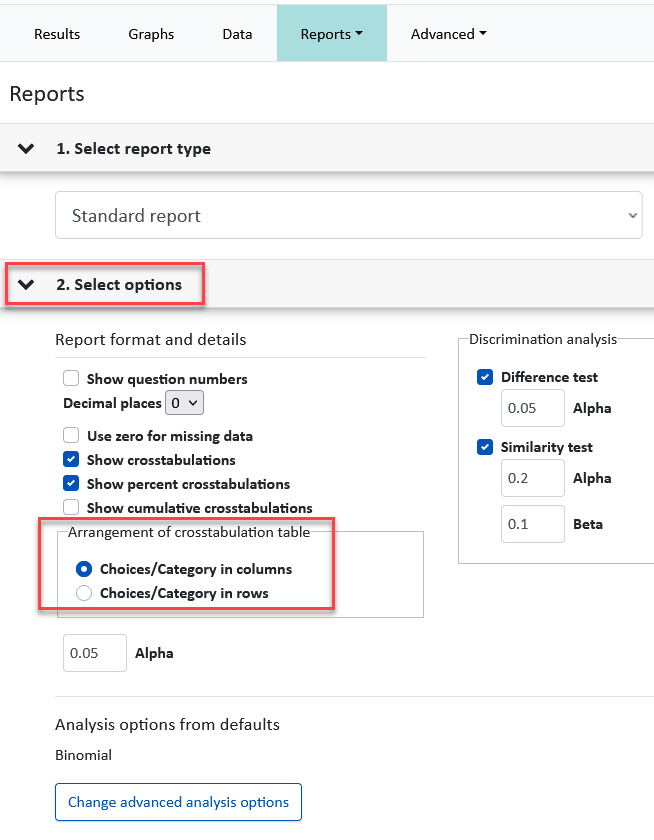
When a Duo-Trio related Choose data is collected, the analysis will display the Crosstabulation and Percentage Crosstabulation tables.

To change the Crosstabulation format, when generating the Standard report in the Results area, expand Select options and choose what works best for your analysis needs.
Panelist Performance Report
Run a Panelist Performance report in the Panelists library to see how your panelists have performed over multiple Duo-Trio tests over time, allowing you to discover patterns or non-differentiators. The workflow for the report will be available soon.
Data
You can use the Data tab for another quick and easy insight into panelist performance within a single test (rather than across multiple tests as described above). The example screenshot below was taken in a test that had a back to back Duo-Trio scenario where same two samples were evaluated in back to back (in reps).
Graphs
The data from single and back to back Duo-Trio tests with two samples can also be graphed. To generate the graph:
- In the Results area, click the Graphs tab.
- In the left sliding pane, select the Duo-Trio question.
- Update any of the parameters in the right sliding pane.
Graphs cannot be generated on Duo-Trio related comment and CATA questions, and on back-to-back Duo-Trio with 4 or more samples.